How to Create a Customer Service Training Manual From Scratch
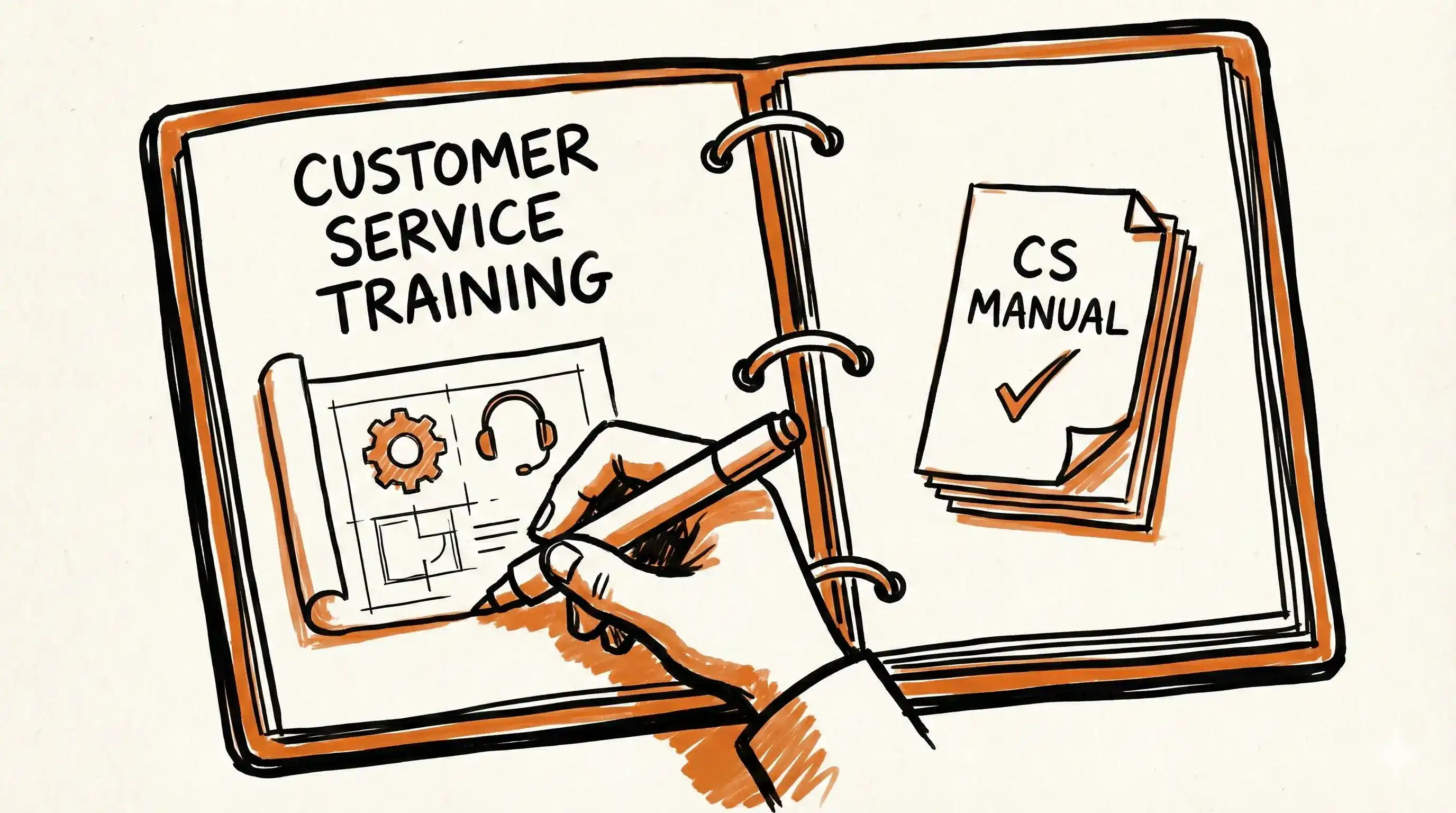
Did you know that 54% of customers feel like customer service is an afterthought for most businesses they engage with?
There are many ways to improve customer satisfaction, from adding new communication channels, hiring additional agents and motivating them to provide great customer service.
But everything starts with training your customer service representatives and providing them with resources and a knowledge base they can consult when in doubt.
In this article, we’ll explain how to create a customer service training manual and everything you need to include in it.
What is a customer service training manual?
A customer service training manual is a document that provides customer service reps with guidelines on how to provide excellent service to their clients.
They’re used when training new team members but also help existing customer service agents learn how to implement new tools and maintain the same standard of customer support, ensuring consistency in service quality.
Depending on the company, customer service training manuals often include company policies, rules, steps and action plans for resolving customer problems.
Build your customer service manual
Turn support workflows into step-by-step guides your team can follow—no manual writing.
Why should you create a customer service training manual?
A comprehensive customer service training manual benefits everyone – both your customer service team and clients. Here’s why:
-
Time savings: According to recent research, employees in some companies lose one full day of work every week looking for information that is scattered through different platforms. Thus, creating a comprehensive training manual and collecting all information in one place can support employees by enabling them to focus on things that matter and be more productive.
-
Money savings: One study revealed that companies spend, on average, $1,071 on training per learner. If you’re a small business with no budget to hire professionals to train your customer service team, a comprehensive training manual could be a budget-friendly solution.
-
Onboarding process: It also helps you streamline the onboarding process for new hires as they can use manuals to self-train or check any information they might have forgotten or don’t feel comfortable asking for.
-
Process standardization: Training manuals make sure all your customer service representatives are on the same page and can provide the same level of customer service. This is especially important for large companies with international customer service teams or people working remotely, for whom it might be difficult to have in-person training in a central location.
-
Improved customer service performance: Two-thirds of customers report waiting or repeating the same thing multiple times to different agents as the most frustrating aspect of receiving customer service help. Therefore, providing your customer service team with resources and information will enable them to be more efficient and provide better service and customer experience.
-
Increased customer retention: Did you know that during the last year, almost 50% of customers have left at least one brand they’ve previously been loyal to due to bad customer experience? By investing in customer service training manuals, you’re investing in improving relationships with customers and retaining them.
Create your customer service manual
Automate your process documentation and share guides with your team.
Customer service training manual: What to include

Creating a comprehensive manual will largely depend on your industry, but here are some universal sections that can serve you as a customer service training manual template.
Training objectives
If you’re wondering how to create a training manual, it’s always good to start by writing an outline and thinking about the goals you want to achieve with it.
In the first section, you should outline objectives, goals and specific customer service skills your employees should get after reading the training materials.
Those could include developing soft skills, communication, problem-solving, assertiveness etc.
Customer service best practices
In this section, you can provide examples of positive customer interactions aligned with your company values and mission statement. The goal is to ensure consistent customer experience, no matter which customer service rep a client might be talking to.
You can also add tips for improving communication skills, such as practicing active listening and empathy, using positive language etc.
Customer service policies
Depending on your industry, you may need to add specific customer service policies. For example, if you’re working in the healthcare industry, there should be rules on handling sensitive information and respecting client’s privacy.
This section should also include a quick list of dos and don’ts that customer service reps can check whenever in doubt.
Customer service policies also help manage customer expectations as they clearly outline to what extent customer service reps can help clients.
Product and service information
There should be a separate section with detailed information about your company’s products or services. Make sure it’s well-organized and easy to browse if your agents need to check something quickly during a call with a customer.
This section is an essential part of your company knowledge base, and it’s helpful not only to your support team members but to all employees and even external stakeholders. Here are some use cases for knowledge base creation that might be helpful.
Conflict resolution
Knowing how to handle conflicts is essential to providing a good customer service experience and reducing customer churn.
No matter what you do, there will always be some difficult customers, so it’s important to prepare your support reps for these situations in advance.
You can provide guidelines on dealing with demanding customers and preventing conflicts from escalating further.
The best way to do so is by creating scenario-based solutions and responses for any unpleasant situation that might occur in your industry.
FAQs
There are two ways to create this section.
First, if your company already has a customer service training program, you can include commonly asked questions in the manual, saving a lot of time as questions don’t have to be answered individually.
You could even create an anonymous form where each team member could ask questions they were too afraid to ask in person, maybe because they considered them basic concepts. You might be surprised to discover that some topics and doubts are repeated over and over again, which might be a sign they’re worth including in this section of the manual.
On the other hand, you may want to combine a training manual with creating a comprehensive customer service knowledge base. In that case, the FAQ section should cover all the common customer concerns in one place so that your agents don’t have to spend much time searching for answers.
Resources and references
Don’t forget to add additional employee resources, which may depend on your industry.
For example, if you’re creating a salesman training manual, you may want to add links to other sales and marketing materials.
Also, link to laws, rules and regulations your company should comply with.
What to include in your manual
Document processes in minutes and share guides with your support team.
How to create a customer service training manual with MagicHow
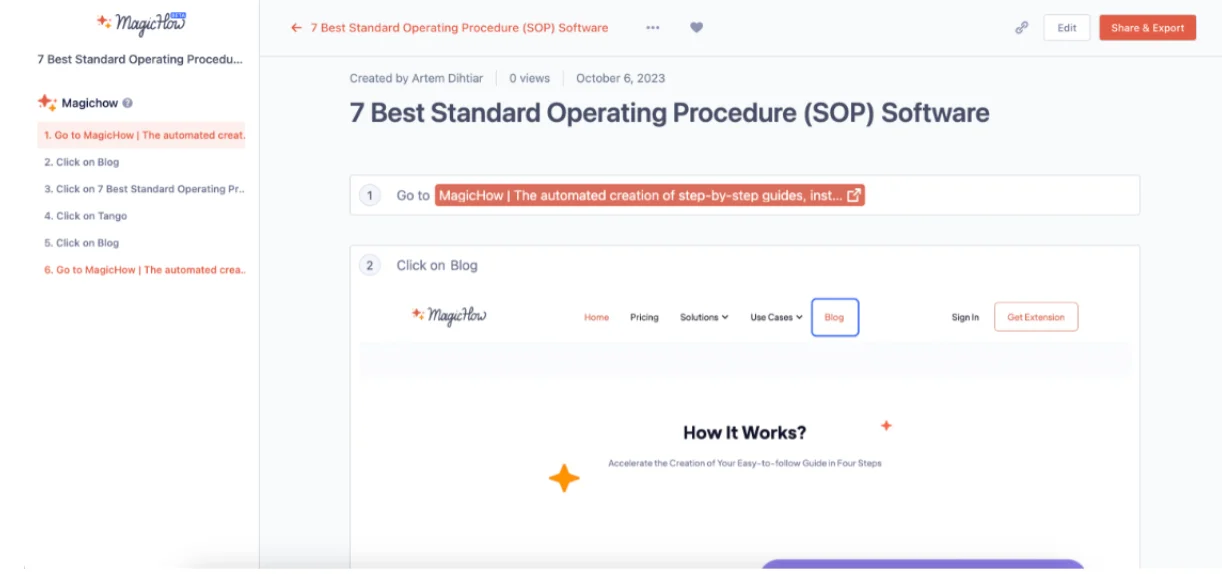
MagicHow is AI-powered process documentation software that can help you create all kinds of business documents, from SOPs, tutorials and how-to guides to comprehensive customer service training manuals.
Thanks to its high level of automation, MagicHow saves you a lot of time and reduces manual work when creating documentation.
Here, you can learn more about all the ways MagicHow can help your customer support team, but now let’s get into actual steps on how to create a training manual using our tool:
Install it
MagicHow has both desktop and browser version that is compatible with Chrome, Firefox, Edge and Safari, meaning that you can access your training manuals and documents from any device.
The installation process is quick and easy – it takes only a few clicks to set up your account and start creating manuals.
Record the process you want to teach
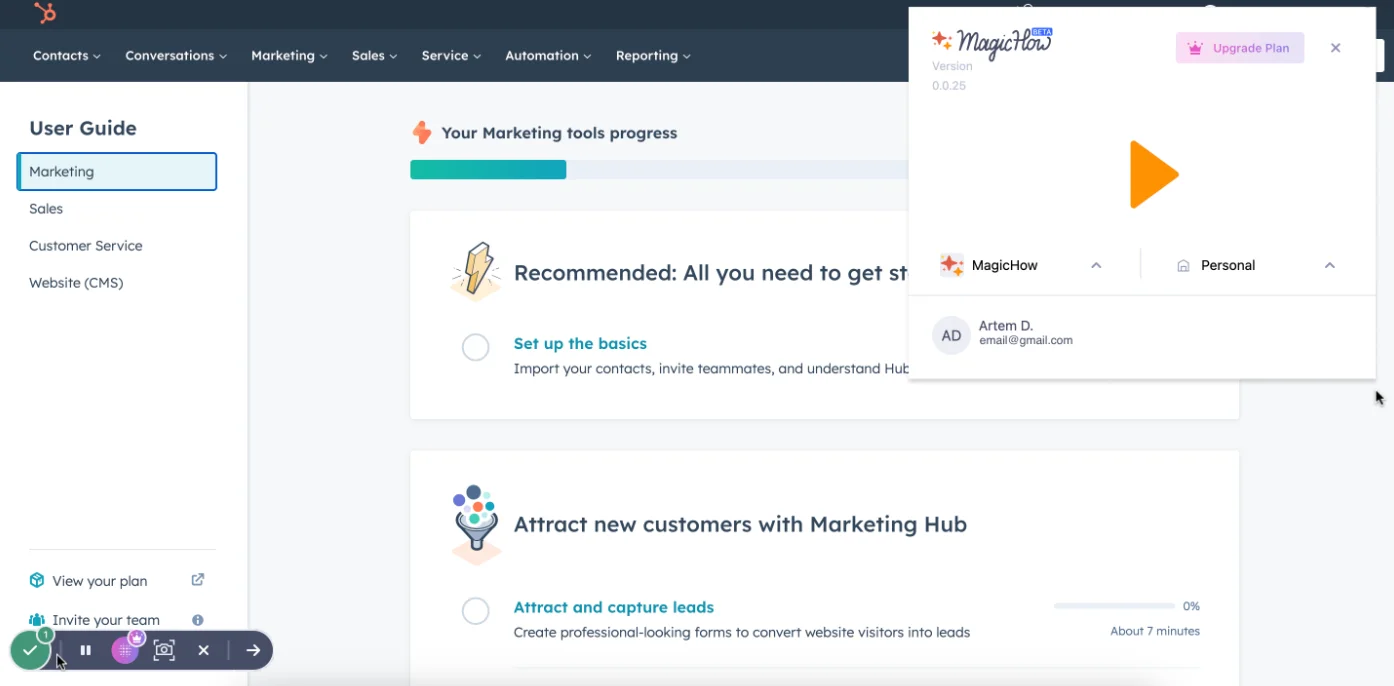
With our SOP software, you don’t need to write thorough explanations for each step of a particular procedure.
All you have to do is record yourself performing a process, and we’ll do the rest.
Press the recording button and then perform a process like you’d usually do, step-by-step.
When you finish, stop recording, and our tool will automatically split the process into logical steps, followed by screenshots.
Customize your customer service training manual
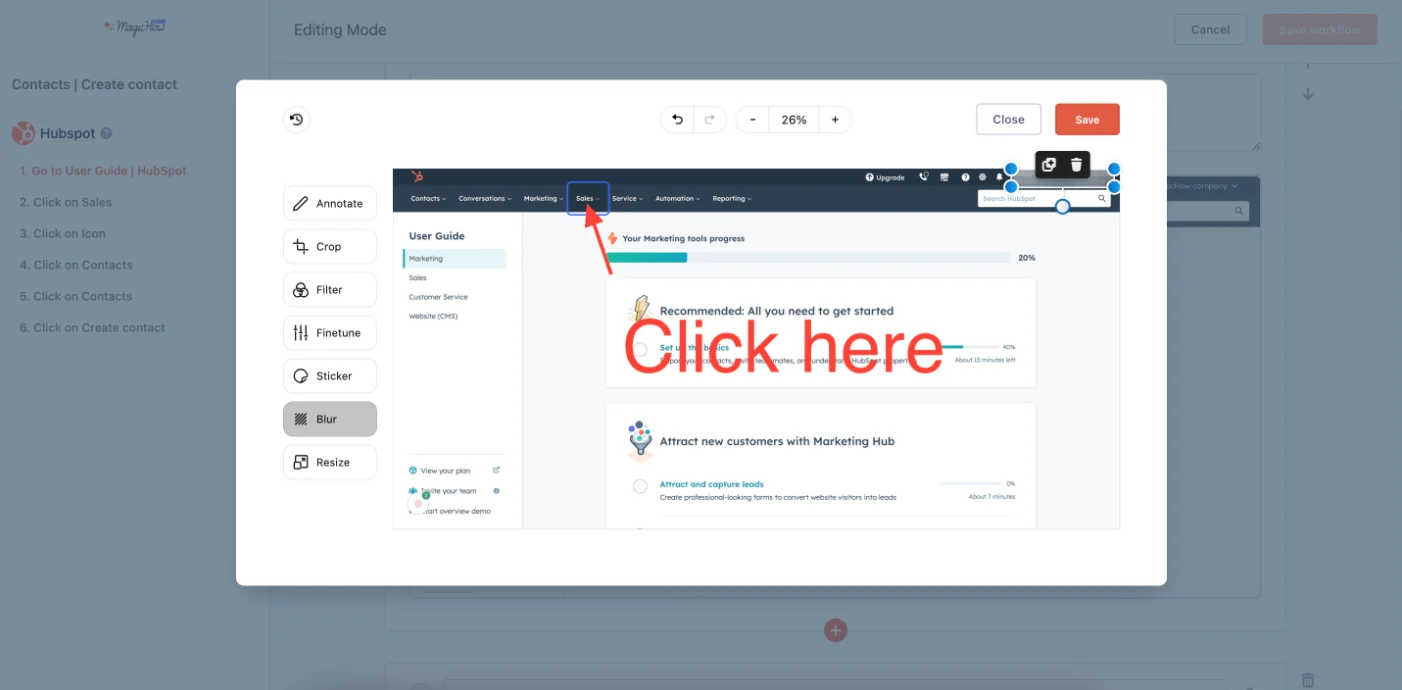
MagicHow has a lot of customization options, such as:
- Adding step titles and descriptions: You can attach additional information and comments if you want to describe steps in detail or add some tips.
- Blurring sensitive data: You can blur any confidential data, such as personal information or photos, to protect the privacy of your employees and customers.
- Cropping pictures: If you don’t like a screenshot MagicHow has generated, you can easily crop it to remove any irrelevant or unnecessary details.
- Adding logos: Adding your company logo to every page allows you to create branded customer service manuals that appear more professional and trustworthy.
- Changing style: You can make your manuals more appealing by customizing style, colors and fonts. Or you can use your company font and colors, providing consistency with your other employee training manuals.
- Replacing or merging the slides: MagicHow goes into detail with our business process documentation practices, documenting every step along the way, but if you want to streamline training procedures and avoid redundancy, you can easily replace or merge slides.
Here, you can get even more tips on process documentation best practices.
Create your training manual in minutes
Record once, get annotated steps and screenshots—customize and share with your support team.
Share your customer service training manual
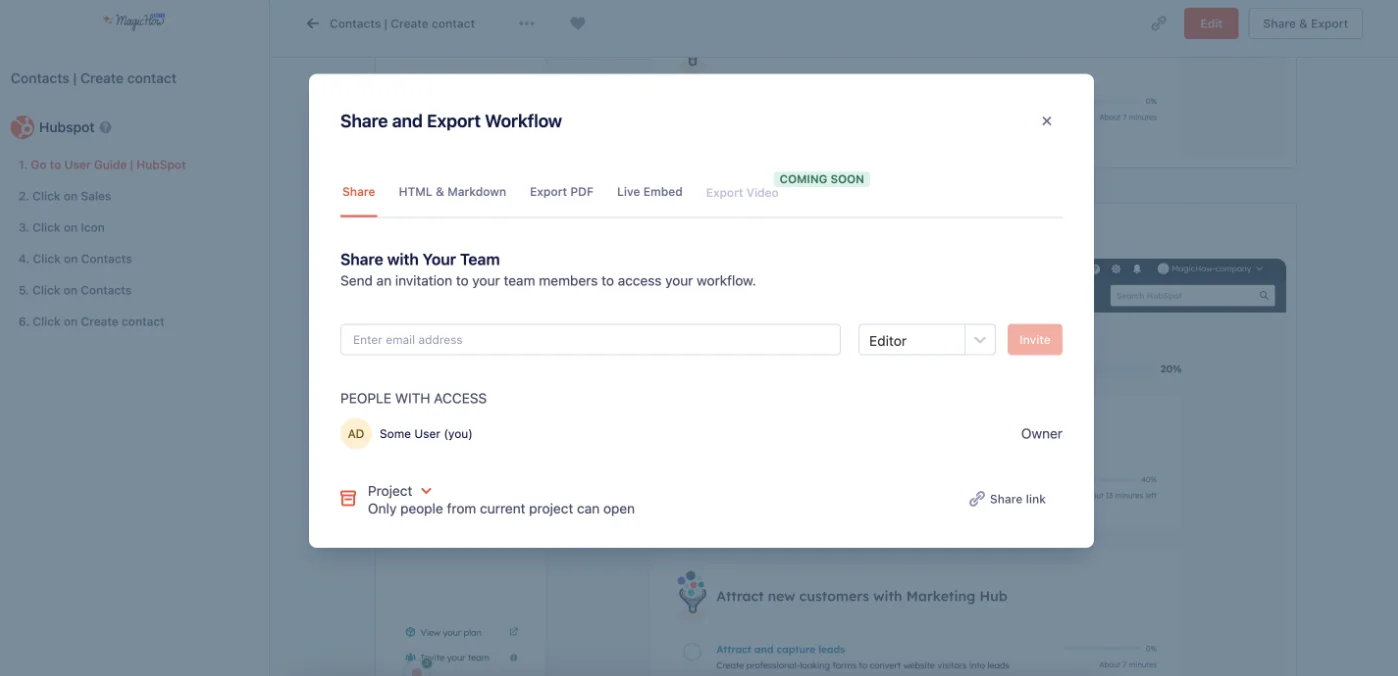
The best customer service manual is one that’s easily accessible whenever an employee runs into a problem or a doubt, and that’s why we made our manuals super-sharable.
There are four ways to share it with your customer support team. You can:
- Simply send them a link to the manual (you can manage access and allow it only to particular staff members or everyone)
- Export a manual in PDF
- Embed it in Notion, Confluence, Zendesk, Webflow and other tools
- Publish a manual on your website as HTML or Markdown
Ask for feedback and refine
Just like customer service training programs, manuals should also be a work in progress.
Invite your customer support staff to read and review the training manual and be open to comments and suggestions on what can be improved.
Finally, they’re the ones on the front lines and dealing with customer issues all day long.
Ready to build your training manual?
Document processes in minutes and share guides with your support team.
Conclusion
By now, you should understand that the quality of customer service plays an essential role in creating an excellent customer experience.
The best way to train your customer service team members is to provide them with a comprehensive manual they can check whenever they’re in doubt.
Creating such a manual doesn’t have to be complicated or take long hours. With MagicHow, you can build training manuals with just a few clicks.
All you have to do is press the record button and perform the procedure as usual – we’ll take care of the rest, providing you with screenshots and breaking down the process into logical steps every team member can follow.
Create your customer service training manual today
Record support processes once and get step-by-step manuals—ready to share with your team.
Learn what's new
Latest articles, tips and product updates — stay in the loop with our blog.
FREE Universal SOP Template (And How to Write Your Own)
Use a free universal SOP template and learn how to write clear, effective procedures for any team or industry.

Top 7 SOP Software Tools for 2026: Here's What to Pick
Discover the right SOP software to optimize your business. Save hours by creating easy-to-follow guides and manuals in minutes.
Top 10 Business Process Documentation Software Compared
Compare top 10 business process documentation software to boost onboarding, productivity, and workflow efficiency.
Frequently Asked Questions
How do you write a customer service training manual?
Think about the most common situations and challenges that your customer service agents face, and then create an outline that covers solutions for those situations, as well as your customer service philosophy and actionable tips.
What should be included in customer service training?
The training should include customer service policies and best practices, information about your products and services, guidelines for conflict resolutions and answers to frequently asked questions.
What is a customer support manual?
A customer support manual is a document outlining guidelines for delivering excellent customer service. You can use it during customer support onboarding but also to help existing customer service reps improve their soft skills or solve a particular problem.